
Mouthpiece
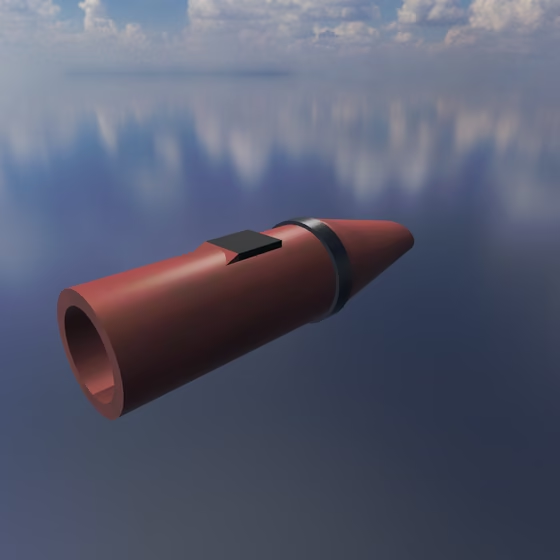
The Mouthpiece blows on each of the physics objects it is connected to via an Exciter Link, as a flute's jet (Jet), a clarinet's reed (Reed), a brass player's lips (Lip), or a harmonica's reed (Free Reed). Breath is how hard it blows. The orientation of the Mouthpiece controls the direction it blows in.
A Mouthpiece can be added by dragging it from the Exciter tab of the Object Palette into the 3D view. It is made for blowing a Tube Resonator, but it can blow any Resonator or Body. Like a real wind instrument, it sustains a note for as long as you hold it, and the object it blows sets the pitch (except in Free Reed mode, where the reed plays its own pitch).
The MIDI Note, velocity, Orientation, and Position properties shared by every Exciter are documented on the Exciter & Exciter Link page.
Mouthpiece Properties#
These properties apply in every mode:
- Mode: What the player blows with: Jet is a flute's air jet, best at an open end; Reed is a clarinet's reed and Lip a brass player's lips, both best at a closed end; Free Reed is a harmonica's or accordion's reed, which plays its own pitch (set by Reed Pitch) and works best on a light object, such as a Body on a Spring. The panel shows only the settings that apply to the selected mode.
- Breath: How hard the player blows. More Breath makes a reed or lips louder and brighter, pushes a jet up to higher harmonics, and makes a free reed louder, brighter and slightly flatter; each needs a little Breath before it sounds at all. The envelope shapes it over the note, while the note's velocity sets Air Speed.
- Air Speed: How loud the note is: how fast the air moves the reed, lips or jet, without changing the pitch or tone. The note's velocity scales it, through the velocity curve.
- Embouchure: How tightly the mouth couples to the object, relative to the object's mass: low lets the object ring on its own, high holds it to the breath.
- Noise: Breath turbulence, in proportion to the air that flows: a breathy tone, and a jet's chiff as the note starts.
Jet#
- Jet Length: How long the jet takes to cross the window at Breath 1, in periods of the note: shorter overblows to a higher harmonic, as harder breath does.
- Offset: Where the jet is aimed off the edge, in jet half-widths: away from 0 the flow turns lopsided and brings the even harmonics.
- Use Dilated Time: Counts the Jet Length in periods of the note, so every note sounds the same harmonic; off, it counts in periods of middle C (C3), a fixed window that overblows as the note rises.
A preset can play up to 64 Exciter Links from Jet Mouthpieces. Any more are silent, and the connection checker points them out.
Reed#
- Reed Resonance: The reed's own pitch, in hertz; below 500 Hz the reed is stiff, a clarinet's. From 500 Hz up, it adds the reed's brightness and, near the bore's modes, its squeak.
- Valve Damping: How freely the reed vibrates. Low values ring more; high values damp the motion.
Lip#
- Lip Pitch: Which harmonic of the note the lips play: 1 is the fundamental, 2 the octave, 3 an octave and a fifth up, and values in between bend the note toward the next harmonic, so sweeping it slurs through them, like a bugle call.
- Tongue: How hard the tongue releases the note: a one-shot kick to the lips when the breath's attack ends, which starts a low note in a tenth of the time the breath alone takes, with a plosive front; 0 is a breath attack, swelling in.
- Valve Damping: How freely the lips vibrate. Low values ring more; high values damp the motion. Values around 0.3 and above can suppress the tone, while very low values can cause flutter.
Free Reed#
- Reed Pitch: The reed's own pitch relative to the note: 1 plays the note itself. Two reeds tuned a hair apart give an accordion's shimmer.
- Tongue: How hard the tongue releases the note: a one-shot kick into the reed's slot when the breath's attack ends, with a plosive front; 0 is a breath attack, swelling in.
- Valve Damping: How freely the reed vibrates. Low values ring more; high values damp the motion. This also changes the breath needed to start the reed and can move its pitch.
Envelope#
The envelope shapes the Breath over each note, in every mode. Drag the points on the graph to set the attack, decay, sustain, and release, and drag the hollow handle on a stage up or down to curve it; double-click a hollow handle to straighten its stage.
- Attack: When the MIDI note is pressed, this is the duration it takes for the envelope to increase from minimum to maximum gain.
- Decay: After the attack phase of the envelope is finished, this is the duration it takes for the envelope to drop from full gain to sustain gain.
- Sustain: After the decay phase of the envelope is finished, this is the fraction of maximum gain that the envelope will sustain.
- Release: When the MIDI note is released, this is the duration it takes for the envelope to decrease from sustain gain to minimum gain.
- Attack Curve: (On the graph) The attack's curvature: 0 rises in a straight line, below 0 rises fast and then slows, above 0 rises slowly and then fast.
- Decay Curve: (On the graph) The decay's curvature: 0 falls in a straight line, below 0 falls fast and then slows, as an analog envelope does, above 0 falls slowly and then fast.
- Release Curve: (On the graph) The release's curvature: 0 falls in a straight line, below 0 falls fast and then slows, as an analog envelope does, above 0 falls slowly and then fast.