
Preset Properties
Every preset has a set of parameters that apply to the overall sound and function of the preset. These controls affect the overall volume, MIDI, and other master settings found in the Preset Properties section.
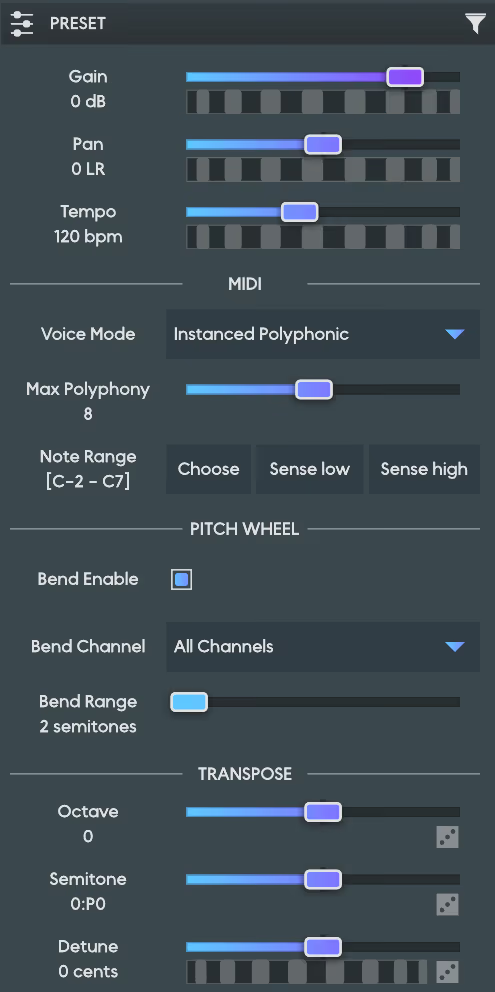
- Gain: The amount of gain that will be applied to the master output signal.
- Pan: Negative values will pan the audio output to the left speaker channel; positive values will pan it toward the right channel. A value of zero will be balanced between the left and right channels. For multichannel configurations, this will pan all pairs of odd and even channels.
- Dry/Wet: This controls the output mix between the completely "dry" input signal (value of 0) and the fully processed "wet" input signal (value of 1). Note: This is only available with the AnukariEffect plugin.
- Tempo: The tempo (in beats per minute) of the main beat clock, which is used for features like synced LFOs. When running Anukari in plugin mode, the tempo is set by the plugin host (DAW) instead.
MIDI Section#
- Voice Mode: The global MIDI control mode affects how Anukari responds to MIDI inputs.
In Singleton mode, you explicitly choose which MIDI note is mapped to each Exciter/Modulator; e.g., if you wish to play a scale, then you will need to design an instrument with an Exciter for each note. This mode requires the most work to create an instrument, but gives you total control.
In Instanced (Polyphonic) mode, the instrument you make is automatically instanced and mapped to all MIDI notes. The number of voice instances controls the maximum polyphony.
In MIDI Polyphonic Expression (MPE) mode, the instrument is set up for compatibility with MPE devices such as the Roli Seaboard or Linnstrument. If your MPE controller allows you to choose between MPE Mode 3 and MPE Mode 4, generally Mode 4 works best with Anukari.
- Max Polyphony: The number of distinct notes that can be played at a time before the least recently played note will be replaced by a new note. Larger values use more system resources and are more taxing on the CPU.
- Note Range: This sets the lowest and highest MIDI notes that the instrument will respond to. This can be useful, for example, to prevent the instrument from responding to high notes that you have determined are likely to cause physics explosions.
Click the "Choose…" button to manually assign the note range for the preset using an on-screen piano keyboard. Click "Sense Low…" to assign the lowest note for the preset by pressing any note on your MIDI input device. Click "Sense High…" to assign the highest note for the preset by pressing any note on your MIDI input device.
Pitch Wheel Section#
- Bend Enable: Whether MIDI pitch bend messages should be automatically applied globally to the instrument. You may wish to disable this if you are using pitch bend as a modulation source and want full control.
- Bend Channel: The MIDI channel on which to receive pitch bend messages.
- Bend Range: The number of semitones (up and down) of pitch bend range for global MIDI pitch bend messages.
MPE Section#
This section is visible only when the Voice Mode is set to MIDI Polyphonic Expression (MPE).
- MPE Pitch Range: The number of semitones (up and down) of pitch bend range for MPE member channel pitch bend messages. This is typically 48 or 96, but varies between MPE instruments. Check your MPE instrument's manual to find the correct setting.
- MPE Zone: The MPE protocol allows two MPE instruments to coexist on "upper" and "lower" zones, somewhat like two channels. This is an advanced option; it is recommended to select Lower unless the manual for your MPE instrument instructs you to do otherwise.
- MPE Channels: The number of MIDI channels used by the selected MPE zone. This is an advanced option; it is recommended to select 15 unless the manual for your MPE instrument instructs you to do otherwise.
Transpose Section#
- Octave: The number of octaves by which to raise or lower the pitch of the entire preset. Careful! Depending on the preset, large values may cause physics explosions.
- Semitone: The number of semitones (interval) by which to raise or lower the pitch of the entire preset.
- Detune: The number of cents by which to raise or lower the pitch of the entire preset.